Table of Contents
- Introduction to CFD Software
- What Is Computational Fluid Dynamics?
- How CFD Software Works
- Major Types of CFD Analysis
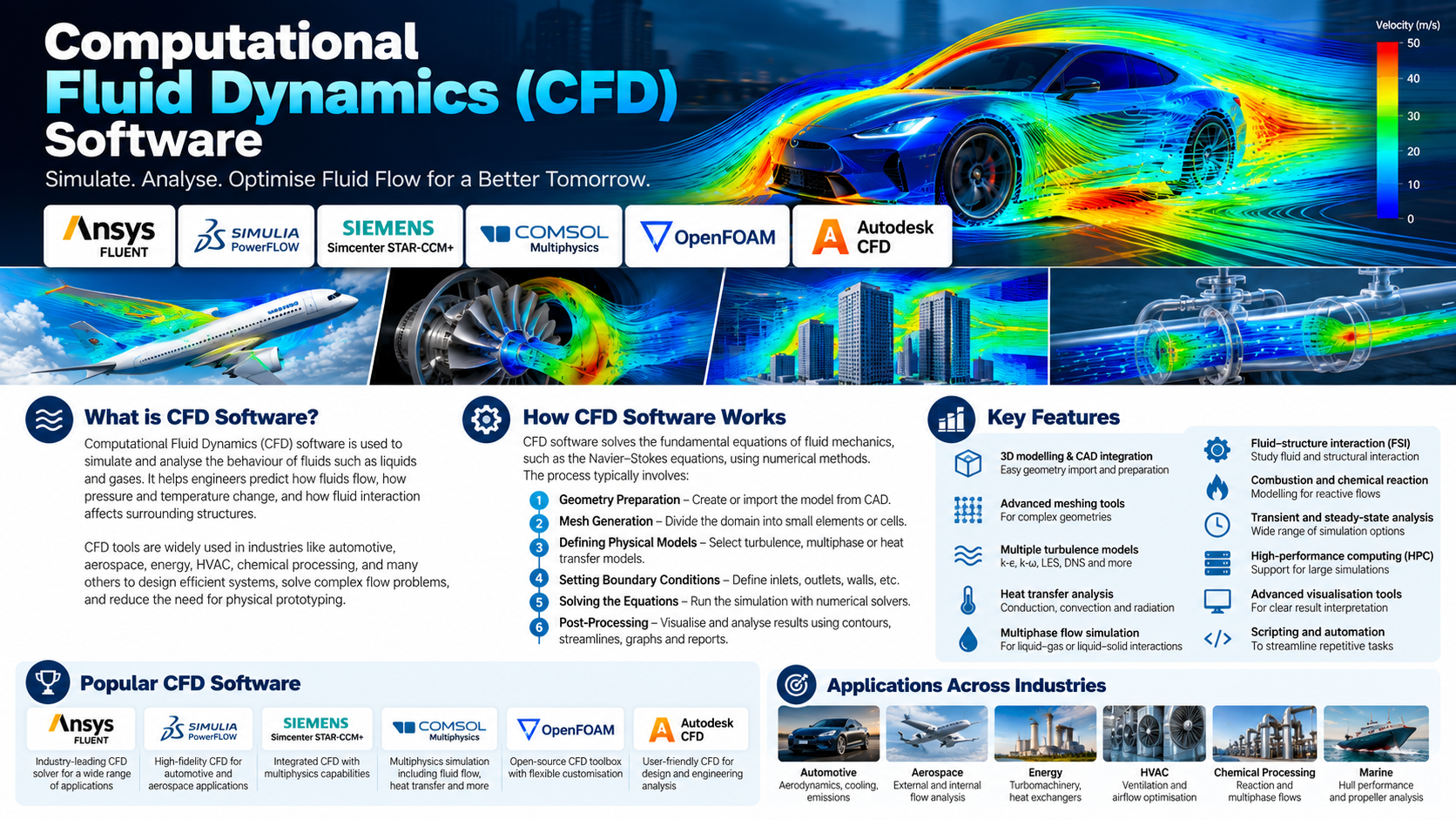
- Popular CFD Software
- Essential Features of CFD Tools
- The CFD Simulation Workflow
- Understanding Meshing and Boundary Conditions
- Turbulence Modelling in CFD
- Heat Transfer and Multiphase Flow Simulation
- CFD Applications Across Industries
- Benefits of CFD Simulation
- Challenges and Limitations
- How to Choose the Right CFD Software
- Best Practices for Reliable CFD Results
- Emerging Trends in CFD Technology
- Frequently Asked Questions
- Conclusion
1. Introduction to CFD Software
Fluid flow is involved in countless engineering systems, from air moving around a vehicle to coolant circulating through an electronic device, water flowing through a pipeline, and gases passing through an industrial turbine. Understanding these flows is essential for designing products that operate efficiently, safely, and reliably.
Traditionally, engineers studied fluid behaviour through mathematical calculations, experiments, physical prototypes, and laboratory testing. These methods remain important, but they can become expensive or difficult when a system has complicated geometry, turbulent flow, heat transfer, chemical reactions, or several interacting physical processes.
Computational Fluid Dynamics (CFD) software addresses these challenges by using numerical methods to simulate the behaviour of liquids and gases. It allows engineers to investigate velocity, pressure, temperature, turbulence, and other flow characteristics within a digital model of a physical system.
For example, an engineer developing an electric vehicle battery cooling system can use CFD to study how coolant moves through a cooling plate and identify regions where heat removal may be insufficient. An aerospace engineer can investigate airflow around an aircraft component, while a process engineer can examine pressure losses through a pipe network.
CFD is not limited to visualising fluid movement. It can help compare design alternatives, investigate operating conditions, estimate performance, and identify potential problems before equipment is manufactured or modified.
The software market includes commercial platforms such as Ansys Fluent, STAR-CCM+, and COMSOL Multiphysics, as well as open-source tools such as OpenFOAM. These applications differ in solver capabilities, ease of use, automation, supported physics, and licensing models.
Choosing an appropriate CFD tool requires understanding the physical problem, the level of accuracy required, available computing resources, and the expertise of the engineering team. Equally important is understanding that simulation results are predictions based on mathematical models and assumptions, not automatic guarantees of real-world performance.
2. What Is Computational Fluid Dynamics?
Computational Fluid Dynamics is a branch of fluid mechanics that uses numerical computation to analyse the movement of fluids and related physical processes.
A fluid may be a liquid, a gas, or a mixture of phases. CFD can be used to study systems ranging from simple internal pipe flow to complex turbulent flows around vehicles, heat exchangers, turbines, and industrial equipment.
2.1 The science behind CFD
Fluid motion is governed by conservation principles. Most conventional CFD applications are based on equations describing the conservation of mass, momentum, and, where relevant, energy.
- Conservation of mass: Describes how fluid mass is maintained as it moves through a system.
- Conservation of momentum: Describes how forces affect fluid motion.
- Conservation of energy: Describes how energy is transported and transformed, including thermal effects when these are modelled.
Additional equations may be needed to represent turbulence, chemical species, combustion, radiation, phase changes, or other physical phenomena.
These equations are often too complex to solve analytically for realistic engineering geometries. CFD software therefore approximates them numerically over a computational domain.
2.2 What does CFD software calculate?
Depending on the model and selected physics, CFD software can calculate:
- Fluid velocity and direction.
- Static and total pressure.
- Temperature distribution.
- Turbulence quantities.
- Heat-transfer rates.
- Pressure drop through equipment.
- Aerodynamic lift and drag.
- Flow separation and recirculation.
- Mixing and species concentration.
- Liquid and gas distribution in multiphase systems.
- Forces exerted by fluids on surrounding surfaces.
These results help engineers understand how a system performs under specified conditions.
2.3 CFD versus conventional fluid calculations
Conventional analytical methods are valuable for simple geometries and idealised conditions. For example, established equations can estimate pressure drop in certain pipe flows or predict the behaviour of simple fluid systems.
However, complex geometries and interacting flow phenomena may require numerical methods. CFD can provide a spatially detailed view of the flow field, helping engineers investigate local effects that are difficult to capture with a single analytical calculation.
CFD does not make fundamental fluid mechanics obsolete. Analytical calculations remain useful for initial estimates, checking simulation outputs, and identifying whether numerical results are physically reasonable.
2.4 CFD versus physical experiments
Physical experiments measure the behaviour of actual systems. CFD predicts behaviour through a computational model.
Simulation can make it easier to compare multiple designs and operating conditions, while experiments provide evidence about real-world behaviour. Experimental measurements can also reveal shortcomings in the numerical model.
The two approaches are complementary. For critical applications, CFD results should be supported by appropriate verification, validation, and testing.
3. How CFD Software Works
A CFD simulation transforms a physical fluid-flow problem into a mathematical model that a computer can solve.
The process generally involves geometry preparation, domain definition, meshing, selection of physical models, boundary-condition setup, numerical solution, and post-processing.
3.1 Geometry preparation
The engineer creates or imports a three-dimensional model of the system. The model may represent a pipe, duct, vehicle body, turbine, heat exchanger, or another fluid-handling component.
The geometry is simplified when appropriate. Small features that do not significantly influence the flow may be removed to reduce computational effort.
However, simplification must be performed carefully. A small gap may control leakage, a narrow passage may influence pressure drop, and a small obstruction may create a significant local disturbance.
3.2 Defining the computational domain
The computational domain is the region in which the fluid equations will be solved.
For internal flow, such as flow through a pipe or duct, the domain usually represents the fluid-filled region inside the equipment. For external flow, such as airflow around a vehicle, the domain includes the surrounding fluid region.
The size and shape of the domain can influence the results. For example, an external-flow domain that is too small may artificially constrain the flow around the object.
3.3 Mesh generation
The domain is divided into smaller computational cells or elements. This process is known as meshing or discretisation.
The solver calculates approximate values of fluid quantities across this mesh. Mesh resolution affects how well the simulation captures important features, including boundary layers, wakes, jets, recirculation regions, and steep temperature gradients.
A fine mesh can improve resolution but increases computational cost. The goal is to create a mesh that is sufficiently accurate for the quantities being investigated.
3.4 Selecting physical models
The engineer chooses the models needed to represent the problem.
These may include turbulence models, heat-transfer models, compressibility, multiphase flow, combustion, radiation, or chemical species transport.
Not every simulation requires every model. A simple low-speed flow problem may need only a relatively basic physical setup, while a reacting turbulent flow may require several coupled models.
3.5 Applying boundary conditions
Boundary conditions define how fluid and energy enter, leave, or interact with the domain.
Typical boundary conditions include:
- Inlet velocity or mass flow rate.
- Inlet or outlet pressure.
- Wall conditions and surface roughness.
- Fluid temperature.
- Heat flux or heat generation.
- Rotating-wall or rotating-region conditions.
- Symmetry conditions.
- Periodic boundaries for suitable repeating systems.
The selected conditions should reflect the real operating environment. Unrealistic inlet values, incorrect outlet placement, or unsuitable wall conditions can produce misleading results.
3.6 Solving the governing equations
The solver applies numerical methods to calculate the flow field. Depending on the problem, the analysis may be steady-state or transient.
A steady-state simulation seeks a solution that does not change with time under the specified assumptions. A transient simulation tracks changes over time and is needed when time-dependent behaviour is important.
The solver may require iterations or time steps to reach an acceptable solution. Engineers monitor convergence indicators, residuals, conservation errors, and other diagnostics relevant to the chosen method.
3.7 Post-processing and interpretation
After the simulation, engineers examine the results using visualisations and numerical data.
Common outputs include velocity contours, pressure distributions, streamlines, temperature maps, turbulence quantities, and plots across selected locations.
The results should be interpreted in the context of the original engineering question. A visually attractive flow animation is not sufficient evidence of accuracy; the solution must also satisfy suitable numerical and physical checks.
4. Major Types of CFD Analysis
CFD software supports several categories of flow analysis. The appropriate method depends on the fluid, flow regime, geometry, and physical effects that matter to the problem.
4.1 Internal flow analysis
Internal flow occurs when fluid moves through enclosed passages such as pipes, ducts, valves, channels, and heat exchangers.
CFD can help estimate pressure drop, velocity distribution, recirculation, and flow uniformity. It can also identify regions where flow restrictions or poor distribution may reduce system performance.
Applications include water distribution systems, industrial pipelines, HVAC ducts, coolant passages, and process equipment.
4.2 External aerodynamics
External-flow CFD studies the movement of air or another fluid around an object.
Applications include vehicle bodies, aircraft, wind turbines, buildings, and sports equipment. Engineers may examine lift, drag, pressure distribution, wake development, and the influence of geometry on flow separation.
External-flow simulations require appropriate computational-domain dimensions and boundary conditions to minimise artificial effects from the domain boundaries.
4.3 Turbulent flow simulation
Turbulence involves complex, irregular fluctuations in fluid motion. It occurs in many practical engineering systems, particularly at sufficiently high Reynolds numbers.
Turbulence models estimate the effects of turbulent motion without necessarily resolving every turbulent scale. Different approaches offer different balances between computational cost and physical detail.
The correct model depends on the flow characteristics and the accuracy required.
4.4 Compressible flow
Compressible-flow analysis is important when changes in fluid density are significant. It is common in high-speed aerodynamics, nozzles, turbines, compressors, and gas-flow systems.
Depending on the conditions, simulations may need to account for pressure waves, shocks, temperature changes, and other effects associated with compressible motion.
4.5 Heat-transfer simulation
Thermal CFD studies the movement of heat through fluids and its interaction with surrounding surfaces.
The analysis may include convection, conduction within solids, and radiation when relevant models are available and appropriate.
Applications include electronic cooling, battery thermal management, HVAC systems, heat exchangers, and industrial thermal equipment.
4.6 Multiphase flow
Multiphase CFD models systems containing more than one phase, such as liquid and gas, liquid and solid particles, or immiscible liquids.
Applications include spray systems, boiling and condensation, bubble columns, sediment transport, and selected chemical processes.
These problems can be computationally demanding because the interface between phases and their interactions may need to be represented through specialised models.
4.7 Combustion and reacting flow
Reacting-flow simulations examine fluid motion combined with chemical reactions. Combustion modelling may involve fuel-air mixing, heat release, species transport, and turbulence-chemistry interactions.
Applications include burners, combustion chambers, engines, furnaces, and energy systems.
These models require suitable reaction mechanisms, material properties, operating conditions, and numerical methods.
4.8 Fluid-structure interaction
Fluid-structure interaction occurs when fluid forces affect a structure and structural deformation changes the surrounding flow.
Examples include flexible pipes, selected valve systems, aeroelastic structures, and components exposed to changing fluid loads.
Some problems can be analysed using one-way coupling, where fluid loads are transferred to a structural model. Others require two-way coupling, in which fluid and structural solutions influence each other.
5. Popular CFD Software
CFD software ranges from broad commercial engineering platforms to specialised and open-source solvers. Each option has strengths that depend on the type of flow, required physical models, available expertise, and workflow requirements.
5.1 Ansys Fluent
Ansys Fluent is a widely used CFD application for simulating fluid flow, heat transfer, turbulence, and selected multiphysics phenomena.
It supports a broad range of engineering problems, including internal and external flow, rotating machinery, thermal management, and reacting flows, subject to the models and configuration used.
Fluent is often considered by organisations that need a mature commercial CFD workflow with established pre-processing, solver, and post-processing capabilities.
Best suited for: General-purpose industrial CFD, thermal-fluid analysis, turbulence, and complex engineering flows.
Considerations: Effective use requires appropriate model selection, meshing, boundary-condition setup, solver configuration, and verification.
5.2 Siemens Simcenter STAR-CCM+
STAR-CCM+ is a commercial multiphysics simulation platform with extensive CFD capabilities. It is used for applications such as aerodynamics, thermal management, rotating machinery, and industrial fluid systems.
Its integrated workflow supports geometry preparation, meshing, simulation, and post-processing. Automation and design exploration can also be important in workflows involving repeated simulations.
Best suited for: Complex industrial CFD, automated simulation workflows, and multidisciplinary fluid-flow problems.
Considerations: The level of training and computing resources required depends on the complexity of the model and the selected physical approaches.
5.3 OpenFOAM
OpenFOAM is an open-source computational fluid dynamics toolbox used in engineering, research, and specialised simulation development.
It provides a range of solvers and modelling capabilities for fluid flow and related physical processes. Users can also modify or extend parts of the software to suit particular computational requirements.
Its flexibility makes it valuable for researchers and engineers who want control over their simulation methods and workflows.
Best suited for: CFD research, customised solvers, academic projects, and engineering teams comfortable with technical configuration.
Considerations: Users may need to handle setup, meshing, solver configuration, scripting, and troubleshooting with less guided support than some commercial platforms provide.
5.4 COMSOL Multiphysics
COMSOL Multiphysics supports CFD as part of a broader environment for modelling interacting physical phenomena.
It is useful when fluid flow must be connected with heat transfer, structural behaviour, chemical species transport, or other physics supported by the relevant modules.
Best suited for: Coupled fluid and thermal problems, multiphysics research, and specialised engineering applications.
Considerations: Available functionality depends on the relevant product modules and the suitability of the selected physical models.
5.5 Autodesk CFD
Autodesk CFD is associated with fluid-flow and thermal simulation workflows for engineering design. It can be relevant for investigating airflow, pressure distribution, and heat transfer in selected systems.
Best suited for: Selected design-focused CFD and thermal-flow studies.
Considerations: Before selecting it for a new project, verify current product availability, licensing, supported workflows, and compatibility with the team’s design environment.
5.6 SimScale
SimScale is a cloud-based engineering simulation platform that provides access to supported CFD and other simulation workflows through a web-based environment.
Its cloud-oriented approach can reduce the need for users to manage a full local simulation infrastructure, depending on the project and service plan.
Best suited for: Cloud-based simulation, collaborative engineering, and teams evaluating CFD without managing all computing infrastructure locally.
Considerations: Available solvers, project limits, computing resources, data handling, and licensing depend on the service configuration.
5.7 FLOW-3D
FLOW-3D is a CFD software family known for specialised free-surface flow modelling and applications involving complex liquid movement.
It is used in areas such as casting, hydraulic engineering, and other problems where fluid interfaces and free-surface behaviour are important.
Best suited for: Selected free-surface flow, casting, hydraulic, and liquid-process simulations.
Considerations: Evaluate the specific FLOW-3D product and model capabilities against the physical requirements of the project.
5.8 SU2
SU2 is an open-source computational analysis and design software framework with capabilities that include computational fluid dynamics and aerodynamic design optimisation.
It is particularly relevant to research and engineering workflows involving aerodynamics, numerical methods, and optimisation.
Best suited for: Aerodynamic analysis, research, and selected design-optimisation applications.
Considerations: Users should confirm the solver’s suitability for their flow regime, physical models, and implementation requirements.
5.9 Comparing CFD platforms
| Software | Main strength | Typical applications |
|---|---|---|
| Ansys Fluent | Broad commercial CFD capabilities | Industrial flow, turbulence, heat transfer, reacting flow |
| Siemens Simcenter STAR-CCM+ | Integrated CFD and simulation automation | Complex product engineering and industrial flows |
| OpenFOAM | Open-source flexibility | Research, customised CFD, advanced user workflows |
| COMSOL Multiphysics | Coupled physics | Fluid flow combined with thermal, structural, or chemical effects |
| Autodesk CFD | Design-focused fluid and thermal studies | Selected engineering flow and cooling problems |
| SimScale | Cloud-based simulation | Collaborative CFD and accessible computing workflows |
| FLOW-3D | Specialised free-surface flow | Hydraulics, casting, and liquid processes |
| SU2 | Open-source CFD and optimisation | Aerodynamics and research |
No single application is best for every CFD problem. A specialist studying complex aerodynamic flows may prioritise different capabilities from an engineer designing cooling channels or modelling free-surface liquid behaviour.
6. Essential Features of CFD Tools
When comparing CFD software, engineers should look beyond the number of features and assess whether the application can solve their actual engineering problems.
6.1 Geometry handling
The software should support the team’s CAD formats and provide reliable methods for preparing the fluid domain.
Useful functions include geometry repair, extraction of fluid regions, simplification, surface checking, and handling of complex assemblies.
6.2 Meshing capabilities
A strong meshing workflow should provide control over cell size, local refinement, mesh quality, and near-wall resolution.
Depending on the application, the software may support structured, unstructured, polyhedral, or other mesh types. The best choice depends on geometry, numerical method, physical models, and computational constraints.
6.3 Physical models
Check support for the phenomena that matter to the problem, such as turbulence, compressibility, heat transfer, multiphase flow, combustion, radiation, and rotating machinery.
Advanced physical models should be selected because they are needed, not simply because they are available.
6.4 Solver robustness
The solver should provide appropriate numerical methods, convergence monitoring, diagnostic information, and controls for difficult cases.
Solver robustness is especially important for complex geometries, strongly coupled physics, transient flows, and problems involving large changes in flow conditions.
6.5 Post-processing and visualisation
Useful post-processing tools include contour plots, streamlines, vectors, particle tracks, surface pressure maps, temperature distributions, and graphs.
Engineers should be able to extract quantitative data and compare cases, not just create images of the flow.
6.6 Automation and parametric studies
Automation helps engineers run repeated simulations with different geometry parameters, operating conditions, or design alternatives.
Batch execution, scripting, reusable templates, and automated reporting can reduce repetitive work, although the workflow should include checks for failed or invalid cases.
6.7 High-performance computing
Large CFD simulations may require parallel computing, substantial memory, and significant processing time.
The software should match the organisation’s available computing infrastructure and provide a practical approach to scaling workloads when larger models are needed.
6.8 Data management and collaboration
Engineering teams may need to share geometry, mesh settings, solver configurations, results, and reports.
Version control and clear documentation help preserve the connection between a simulation result and the design revision or operating conditions it represents.
7. The CFD Simulation Workflow
A well-planned CFD study follows a repeatable process that connects the engineering objective with a defensible numerical result.
Step 1: Define the engineering objective
Identify the question the simulation must answer. It might involve pressure drop, heat-transfer performance, airflow distribution, aerodynamic force, or mixing efficiency.
Define the quantities that will be used to assess the result and establish acceptable limits where possible.
Step 2: Prepare the geometry
Create or import the model and simplify irrelevant details. Confirm that the geometry represents the physical system closely enough for the intended analysis.
For internal-flow problems, extract the fluid-filled region. For external flow, create an appropriate surrounding domain.
Step 3: Choose the physical models
Determine whether the flow is laminar or turbulent, compressible or incompressible, steady or transient, single-phase or multiphase.
Consider whether heat transfer, chemical reactions, radiation, or fluid-structure interaction must be included.
Step 4: Generate the mesh
Discretise the domain using an appropriate mesh type and resolution.
Refine areas where important flow features are expected, such as narrow passages, jets, boundary layers, wakes, and regions with strong temperature or velocity gradients.
Step 5: Assign material properties
Define relevant fluid properties, including density, viscosity, heat capacity, thermal conductivity, and other parameters required by the model.
For temperature-dependent or compressible flows, material properties may need to vary with local conditions.
Step 6: Apply boundary and initial conditions
Specify inlet and outlet conditions, wall behaviour, temperatures, pressures, flow rates, and other required inputs.
For transient simulations, define the initial state and an appropriate time-step strategy.
Step 7: Configure and run the solver
Choose numerical schemes, convergence criteria, and solution controls appropriate to the problem.
Monitor convergence and physical diagnostics. If the solver struggles, investigate the cause rather than assuming that changing arbitrary settings will resolve it.
Step 8: Verify the numerical solution
Check residual behaviour, mass conservation, energy conservation where applicable, mesh sensitivity, and the stability of key output quantities.
A converged solution is not automatically accurate, so numerical verification must be considered alongside the physical assumptions.
Step 9: Analyse the results
Examine pressure, velocity, temperature, turbulence, and other relevant fields. Compare different designs or operating conditions using consistent metrics.
Interpret the results using fluid mechanics principles and consider whether the predicted behaviour makes physical sense.
Step 10: Validate and report
Where suitable experimental or benchmark data are available, compare the simulation against them.
Document the geometry, mesh, physical models, boundary conditions, solver settings, key findings, uncertainties, and limitations. This helps others review and reproduce the work.
8. Understanding Meshing and Boundary Conditions
Meshing and boundary conditions are among the most influential parts of a CFD setup. A sophisticated solver cannot compensate for an unsuitable mesh or unrealistic physical inputs.
8.1 Why mesh quality matters
A mesh determines how the computational domain is represented numerically. If important flow features are smaller than the mesh can resolve, the solution may miss or distort them.
For example, a coarse mesh may fail to capture the velocity gradient near a wall or the development of a narrow jet. Refinement may be needed in these regions.
However, increasing the number of cells indefinitely is not a practical solution. Engineers should examine mesh quality, local resolution, computational cost, and the sensitivity of relevant outputs.
8.2 Boundary-layer resolution
In many flows, velocity changes rapidly near a solid wall because the fluid satisfies the selected wall condition. This region is known as the boundary layer.
Capturing it accurately can be important for predicting wall shear stress, drag, heat transfer, and flow separation.
CFD software may use specialised near-wall meshing strategies and turbulence-model requirements. The appropriate setup depends on the selected model and the intended accuracy.
8.3 Common boundary conditions
An inlet may specify velocity, mass flow rate, or total conditions. An outlet may specify pressure or another suitable condition. Walls may be treated as stationary, moving, heated, insulated, or assigned other physical properties.
The correct choice depends on the real system and the mathematical formulation.
Boundary conditions should not be selected solely because they make a simulation easier to solve. They should represent the intended physical environment as accurately as practical.
8.4 Mesh-independence studies
A mesh-independence or mesh-convergence study compares results from meshes with different resolutions.
Engineers may track quantities such as pressure drop, drag coefficient, heat-transfer rate, or velocity at a specific location.
If the important results change significantly with refinement, the mesh or modelling approach may require further investigation. If the results stabilise sufficiently for the engineering purpose, the chosen mesh has stronger numerical support.
Mesh convergence does not prove that the simulation matches reality; it addresses numerical sensitivity rather than every source of modelling error.
9. Turbulence Modelling in CFD
Turbulence is common in practical fluid systems and can strongly affect pressure loss, mixing, heat transfer, and aerodynamic performance.
Turbulent motion contains fluctuations across a wide range of spatial and temporal scales. Resolving all these scales directly can be computationally expensive, so many engineering simulations use turbulence models.
9.1 Reynolds-averaged Navier–Stokes models
Reynolds-averaged Navier–Stokes (RANS) approaches model the effects of turbulent fluctuations on the mean flow.
RANS models are widely used in industrial CFD because they offer a practical balance between computational cost and engineering usefulness.
Common model families include the \(k\)-epsilon and \(k\)-omega approaches, along with variations designed for particular flow characteristics.
No single RANS model is universally best. Model selection depends on the flow, separation behaviour, boundary-layer conditions, available validation data, and required outputs.
9.2 Large Eddy Simulation
Large Eddy Simulation (LES) resolves larger turbulent structures while modelling smaller scales.
It can provide more detailed information about unsteady turbulent behaviour than many conventional RANS approaches, but generally requires more computational resources and careful numerical setup.
LES may be useful when the time-dependent structure of turbulence is important to the engineering question.
9.3 Direct Numerical Simulation
Direct Numerical Simulation (DNS) attempts to resolve the relevant turbulent scales without using a conventional turbulence model for those scales.
For many industrial flows, the required resolution and computational effort are extremely large. DNS is therefore most often associated with fundamental research and selected lower-complexity problems rather than routine industrial design.
9.4 Selecting a turbulence model
The model should match the physical question and available computational resources. Engineers should consider whether the flow involves separation, strong curvature, rotation, jets, wakes, or significant unsteadiness.
Whenever possible, the model should be assessed using benchmark or experimental evidence relevant to the flow being studied.
10. Heat Transfer and Multiphase Flow Simulation
Many engineering systems involve fluid flow combined with thermal effects or interactions between multiple phases.
10.1 Heat transfer in CFD
Heat transfer can occur through conduction, convection, and radiation. CFD commonly models fluid motion and convection, while conduction through solid components can be included in coupled thermal analyses.
This is useful when temperature depends on both the fluid movement and the surrounding solid materials.
Examples include electronic cooling, heat exchangers, battery packs, engines, and industrial furnaces.
10.2 Conjugate heat transfer
Conjugate heat transfer analysis connects heat transfer within solids with fluid flow and heat transfer in adjacent fluids.
For example, in an electronic enclosure, heat generated by components may conduct through a metal heat sink and then transfer to moving air.
A coupled model can help evaluate the relationship between airflow, material conductivity, geometry, and component temperature.
10.3 Multiphase CFD
Multiphase simulation addresses systems involving more than one fluid phase or combinations of fluid and particles.
Different approaches are used depending on whether the phases are mixed, separated, dispersed, or interacting through moving interfaces.
Applications include bubbles in liquids, sprays, liquid films, sediment transport, and selected industrial mixing processes.
10.4 Boiling and condensation
Boiling and condensation involve phase change and heat transfer, often with complex interfacial behaviour.
CFD models for these processes may require specialised equations and parameters. Their accuracy depends on the suitability of the physical model and the quality of supporting experimental data.
10.5 When coupled modelling is necessary
Coupled thermal-fluid or multiphase models are valuable when the interaction between physical processes significantly affects the outcome.
They also increase model complexity and computational cost. Engineers should justify the additional detail based on the actual performance question.
11. CFD Applications Across Industries
CFD is used in many industries because fluid movement and heat transfer influence product performance, energy consumption, reliability, and safety.
11.1 Automotive and transportation
Automotive engineers use CFD to examine aerodynamic drag, cabin ventilation, engine cooling, battery thermal management, and fluid behaviour in selected vehicle systems.
For electric vehicles, thermal-fluid simulation can help assess cooling-channel design and identify uneven temperature distribution in battery systems.
11.2 Aerospace
Aerospace CFD supports the analysis of airflow around aircraft, aerodynamic surfaces, propulsion systems, and other components.
It can help investigate lift, drag, pressure distribution, shock waves, and thermal effects in appropriate flow regimes.
High-speed and compressible-flow problems may require specialised models and substantial computational resources.
11.3 HVAC and building services
Heating, ventilation, and air-conditioning systems depend on airflow distribution, heat transfer, and pressure loss.
CFD can help evaluate duct layouts, room ventilation, thermal comfort, and air movement around equipment.
The usefulness of the analysis depends on appropriate boundary conditions and the representation of occupancy, heat sources, and ventilation systems where relevant.
11.4 Energy and power generation
Power systems include turbines, compressors, boilers, heat exchangers, cooling systems, and fluid transport equipment.
CFD helps engineers examine flow distribution, thermal performance, pressure losses, and selected combustion processes.
11.5 Chemical and process industries
Chemical plants use pipelines, reactors, mixers, separators, and other equipment where fluid flow and heat or mass transfer influence performance.
CFD can support mixing analysis, reactor design, flow distribution, and selected reacting-flow applications.
Complex chemical systems may require validated reaction models and appropriate experimental data.
11.6 Electronics and electrical engineering
Electronic components and power systems generate heat that must be removed to maintain reliable operation.
CFD can examine airflow around circuit boards, cooling through enclosures, heat-sink performance, and fluid flow through liquid-cooling systems.
In electrical engineering, these analyses can complement calculations of electrical losses and thermal performance in motors, power converters, and related equipment.
11.7 Water and environmental engineering
CFD can be applied to selected hydraulic systems, channels, reservoirs, treatment equipment, and environmental-flow problems.
Applications may include flow distribution, mixing, free-surface behaviour, and sediment-related processes, depending on the chosen model.
11.8 Manufacturing and industrial equipment
CFD supports the design of casting processes, industrial cooling systems, lubrication arrangements, pumps, valves, and manufacturing equipment.
For example, simulation may help investigate how molten material fills a mould or how coolant reaches a heated component.
12. Benefits of CFD Simulation
CFD offers several potential advantages when it is used with appropriate modelling and verification.
12.1 Better understanding of flow behaviour
CFD provides detailed information about velocity, pressure, temperature, and other flow quantities throughout a computational domain.
This helps engineers identify local effects that may not be apparent from a single measurement or overall system calculation.
12.2 Faster design comparison
Engineers can compare different geometries, flow rates, inlet conditions, or operating parameters without manufacturing a new prototype for every alternative.
This can make early design exploration more efficient.
12.3 Identification of performance problems
Simulation may reveal flow separation, recirculation, uneven distribution, high-pressure losses, thermal hot spots, or other issues that affect system performance.
The design can then be revised and evaluated again.
12.4 Improved energy efficiency
CFD can help engineers investigate pressure losses, cooling requirements, aerodynamic drag, and other factors related to energy use.
Any claimed efficiency improvement should be quantified through suitable comparisons and, where necessary, validated by testing.
12.5 Support for difficult experiments
Some physical conditions are expensive, hazardous, or difficult to reproduce. CFD can provide insight into selected scenarios that may be challenging to measure directly.
However, the credibility of these predictions depends on the model’s suitability and supporting evidence.
12.6 Better engineering communication
Visualisations and reports can help engineering teams understand flow patterns and discuss alternative designs using a shared technical reference.
Clear reporting should include quantitative evidence and limitations rather than relying only on colour plots.
13. Challenges and Limitations
CFD is a powerful engineering method, but it can produce misleading results if its assumptions and numerical limitations are ignored.
13.1 High computational cost
Large three-dimensional models, transient simulations, complex turbulence models, and multiphase calculations can require substantial computing resources.
Engineers must balance mesh resolution and model complexity against the accuracy required for the task.
13.2 Dependence on input quality
Incorrect geometry, material properties, boundary conditions, or operating assumptions can undermine the simulation.
The solver may still produce a numerical result, but that result may not represent the actual system.
13.3 Mesh sensitivity
A mesh that is too coarse may miss important flow structures. A poorly constructed mesh may also reduce numerical stability or accuracy.
Mesh quality and resolution should be assessed for the quantities used to make engineering decisions.
13.4 Turbulence-model uncertainty
Different turbulence models can produce different predictions for the same problem, especially when the flow involves separation, strong curvature, or unsteady structures.
Model selection and validation are therefore important parts of a credible CFD workflow.
13.5 Convergence does not equal accuracy
A solver may converge to a solution that is inconsistent with the real physical system because of incorrect assumptions or unsuitable boundary conditions.
Convergence is a numerical indicator, not proof that the model is valid.
13.6 Difficult interpretation
CFD results can contain large amounts of data. Engineers must know which quantities are relevant, recognise numerical artefacts, and understand the physical implications of the results.
A colourful plot alone is not sufficient evidence of engineering performance.
13.7 Software and training costs
Commercial CFD software can involve licence fees, training, computing infrastructure, and support costs. Open-source tools may reduce licence expenditure but require technical expertise and additional setup effort.
The most appropriate option depends on the team’s capabilities and the complexity of the intended applications.
14. How to Choose the Right CFD Software
Selecting CFD software should begin with the physical problem and the engineering decisions the simulation must support.
14.1 Define the application
Identify whether the primary requirement is internal flow, external aerodynamics, thermal management, multiphase flow, combustion, rotating machinery, or coupled physics.
This narrows the selection to applications with relevant physical models and solver capabilities.
14.2 Determine the required accuracy
Define the outputs that matter and the level of uncertainty the project can tolerate.
A preliminary design study may need a different level of detail from a safety-critical analysis or a project requiring close correlation with experimental measurements.
14.3 Check geometry and meshing workflows
Evaluate how easily the software handles the team’s CAD models, creates fluid domains, and generates suitable meshes.
A platform that struggles with the actual geometry may create unnecessary preparation work.
14.4 Evaluate physical models and solvers
Confirm that the software supports the necessary turbulence models, thermal effects, compressibility, multiphase methods, or other physics.
Consider the quality of solver diagnostics and the methods available for verifying difficult cases.
14.5 Review computing requirements
Estimate the model sizes and simulation types the team expects to run.
Consider whether local workstations are sufficient or whether high-performance or cloud computing will be useful.
14.6 Compare usability and automation
Review the learning curve, scripting options, parameter studies, automated meshing, and reporting capabilities.
A user-friendly workflow may be particularly valuable when the team must run many simulations repeatedly.
14.7 Assess support and documentation
Consider training resources, technical support, community resources, and the availability of experienced users.
These factors can strongly affect how quickly a team becomes productive.
14.8 Calculate total cost of ownership
Include software licences, optional modules, computing resources, training, support, implementation, and engineering time.
For open-source tools, include the effort required for installation, configuration, development, and maintenance.
14.9 Test a representative engineering case
Run a pilot using a real project. Evaluate setup time, mesh quality, solver behaviour, result interpretation, and the effort needed for verification.
A representative test gives a more realistic view of suitability than a generic feature comparison.
15. Best Practices for Reliable CFD Results
A dependable CFD workflow requires attention to physical assumptions, numerical quality, and engineering interpretation.
Start with a clear objective
Define the question and the quantities that will determine success before creating the model.
Simplify geometry carefully
Remove details that are irrelevant to the flow while retaining features that materially influence the result.
Use realistic boundary conditions
Base inlet, outlet, wall, and thermal conditions on the actual system or a justified engineering approximation.
Choose suitable physical models
Select turbulence, thermal, multiphase, and other models according to the flow physics rather than relying on defaults without review.
Check mesh quality
Refine regions with strong gradients and evaluate whether important outputs are sufficiently stable under mesh refinement.
Monitor convergence and conservation
Examine solver diagnostics and relevant mass or energy balances. Investigate unexpected behaviour rather than accepting a completed run automatically.
Compare with analytical estimates
Simple calculations can provide valuable checks on flow rates, pressure differences, heat transfer, and other quantities.
Validate against experiments where possible
Compare predictions with measurements or suitable benchmark data, particularly when the analysis supports a high-consequence engineering decision.
Document the simulation
Record geometry, mesh, boundary conditions, physical models, solver settings, results, and limitations so the work can be reviewed and reproduced.
Communicate uncertainty
Distinguish numerical results from assumptions and explain the factors that may affect confidence in the predictions.
16. Emerging Trends in CFD Technology
CFD continues to evolve as numerical methods, computing infrastructure, and engineering automation improve.
16.1 AI-assisted CFD
Artificial intelligence and machine learning are being explored for accelerating selected simulation tasks, approximating flow solutions, assisting with meshing, and identifying patterns in large result sets.
Surrogate models can estimate outputs for new design parameters after being trained on suitable simulation or experimental data.
These approaches require validation. An AI-based prediction may be unreliable outside the conditions represented in its training data, and it should not be assumed to replace a physics-based solver for every application.
16.2 Cloud-based simulation
Cloud platforms can provide access to computational resources without requiring every user to maintain a large local computing system.
They may support collaborative workflows and allow teams to scale resources according to project needs.
Data security, cost, connectivity, and project requirements should be considered before adopting a cloud-based workflow.
16.3 High-performance computing
High-performance computing allows large simulations to use many processing resources in parallel.
This can support complex transient flow, detailed turbulence calculations, parameter studies, and multiphysics models.
The practical benefit depends on how well the solver scales and whether the model and numerical method can use the available resources efficiently.
16.4 Automated design optimisation
CFD can be combined with optimisation methods to explore geometry and operating conditions systematically.
An engineer might compare duct shapes to reduce pressure loss or investigate cooling-channel designs to improve temperature uniformity.
Optimisation should account for multiple engineering objectives, manufacturing constraints, and the uncertainty of the simulation model.
16.5 Digital twins
A digital twin connects a digital representation of a physical asset with relevant information from the real system.
CFD may contribute to a digital twin by providing flow models that help interpret operating conditions or investigate possible changes.
A CFD simulation by itself is not necessarily a digital twin; the term implies a meaningful connection between the digital model and the physical asset or its data.
16.6 Greater integration with testing
Engineering teams increasingly compare simulation results with measured performance to improve confidence in their models.
This process can help identify incorrect assumptions, refine boundary conditions, and improve future simulations.
CFD is most valuable when its predictions are integrated into a broader engineering process that includes testing, review, and continuous improvement.
17. Frequently Asked Questions
What is CFD software used for?
CFD software simulates fluid flow and related physical processes. It is used to investigate velocity, pressure, temperature, turbulence, heat transfer, and other quantities in systems such as vehicles, aircraft, pipelines, cooling systems, turbines, and industrial equipment.
Which CFD software is best for beginners?
The best option depends on the intended application and available resources. Ansys Fluent and cloud-based platforms such as SimScale may be worth evaluating for guided engineering workflows. OpenFOAM is a useful option for learners who want to explore open-source CFD and are comfortable with more technical configuration.
Is OpenFOAM free?
OpenFOAM is an open-source CFD toolbox. Although it avoids the conventional commercial licence model, users should account for the time and expertise needed for installation, setup, simulation, and troubleshooting.
What is the difference between CFD and FEA?
CFD focuses on fluid flow and related transport processes. Finite Element Analysis is a numerical method commonly used for structural mechanics and other physical problems. The methods can also be combined in fluid-structure interaction studies.
What is the difference between Ansys Fluent and STAR-CCM+?
Both are commercial CFD platforms with broad engineering applications. Their workflows, modelling options, automation capabilities, licensing, and integration differ. The better choice depends on the specific problem, existing tools, team experience, and required features.
What is meshing in CFD?
Meshing divides the computational domain into smaller cells or elements so the governing equations can be solved numerically. Mesh resolution and quality influence the accuracy and computational cost of the simulation.
Why is turbulence modelling important?
Turbulence affects momentum transfer, pressure loss, mixing, and heat transfer in many practical flows. Turbulence models approximate the effects of turbulent fluctuations, with different models offering different balances between accuracy and computational cost.
What is the difference between steady-state and transient CFD?
Steady-state CFD seeks a solution that does not change with time under the selected assumptions. Transient CFD calculates how the flow evolves over time and is needed when time-dependent behaviour is important.
Can CFD replace physical testing?
No. CFD can reduce the need for some early prototypes and help investigate conditions that are difficult to test, but physical experiments remain important for validation and performance confirmation.
Does CFD require powerful hardware?
Not every simulation requires a high-performance computer. Simple models may run on an ordinary engineering workstation, while large three-dimensional, transient, multiphase, or high-resolution turbulence simulations can require substantial processing power and memory.
What is a CFD boundary condition?
A boundary condition defines how the fluid interacts with the edges and surfaces of the computational domain. Examples include inlet velocity, outlet pressure, wall behaviour, and temperature conditions.
What is mesh independence in CFD?
Mesh independence is assessed by comparing important outputs across meshes with different resolutions. If the results become sufficiently stable as the mesh is refined, there is stronger evidence that the discretisation is adequate for the intended purpose.
Can CFD be used for heat-transfer analysis?
Yes. CFD can model heat transfer involving moving fluids and, in suitable workflows, conduction through surrounding solids and radiation. It is widely used for cooling systems, heat exchangers, electronic enclosures, and thermal management.
18. Conclusion
Computational Fluid Dynamics software enables engineers to investigate fluid movement and related physical processes through numerical simulation. By estimating velocity, pressure, temperature, turbulence, and other flow characteristics, CFD can support better design decisions across industries ranging from automotive and aerospace to electronics, energy, HVAC, and chemical processing.
The available software offers different strengths. Ansys Fluent and Siemens Simcenter STAR-CCM+ provide broad commercial CFD capabilities, OpenFOAM offers an open-source and highly configurable approach, COMSOL Multiphysics supports coupled physical modelling, and specialised tools address particular flow applications. The best choice depends on the problem being solved, the required physical models, the available computing resources, and the team’s expertise.
A successful CFD study involves much more than generating a colourful flow visualisation. Geometry preparation, mesh quality, boundary conditions, turbulence modelling, solver convergence, numerical verification, and validation all influence the credibility of the results.
For beginners, the most effective path is to understand fluid mechanics fundamentals, practise building simple models, compare simulations with analytical estimates, and gradually move towards more complex applications. For professional engineering teams, a structured workflow with documented assumptions and suitable validation is essential.
Ultimately, CFD is most valuable when used as part of a complete engineering process. It helps teams understand complex flow behaviour, compare alternatives, identify potential performance problems, and make informed decisions—while remaining grounded in sound physics, numerical evidence, and engineering judgement.